Competen Practice

Your practice.Wherever you practise.

A portable, longitudinal record of your own clinical work -- across every hospital, clinic, outreach site and teleconsultation. It follows you, not your employer.

Already with us? Practice Login · Patient Login

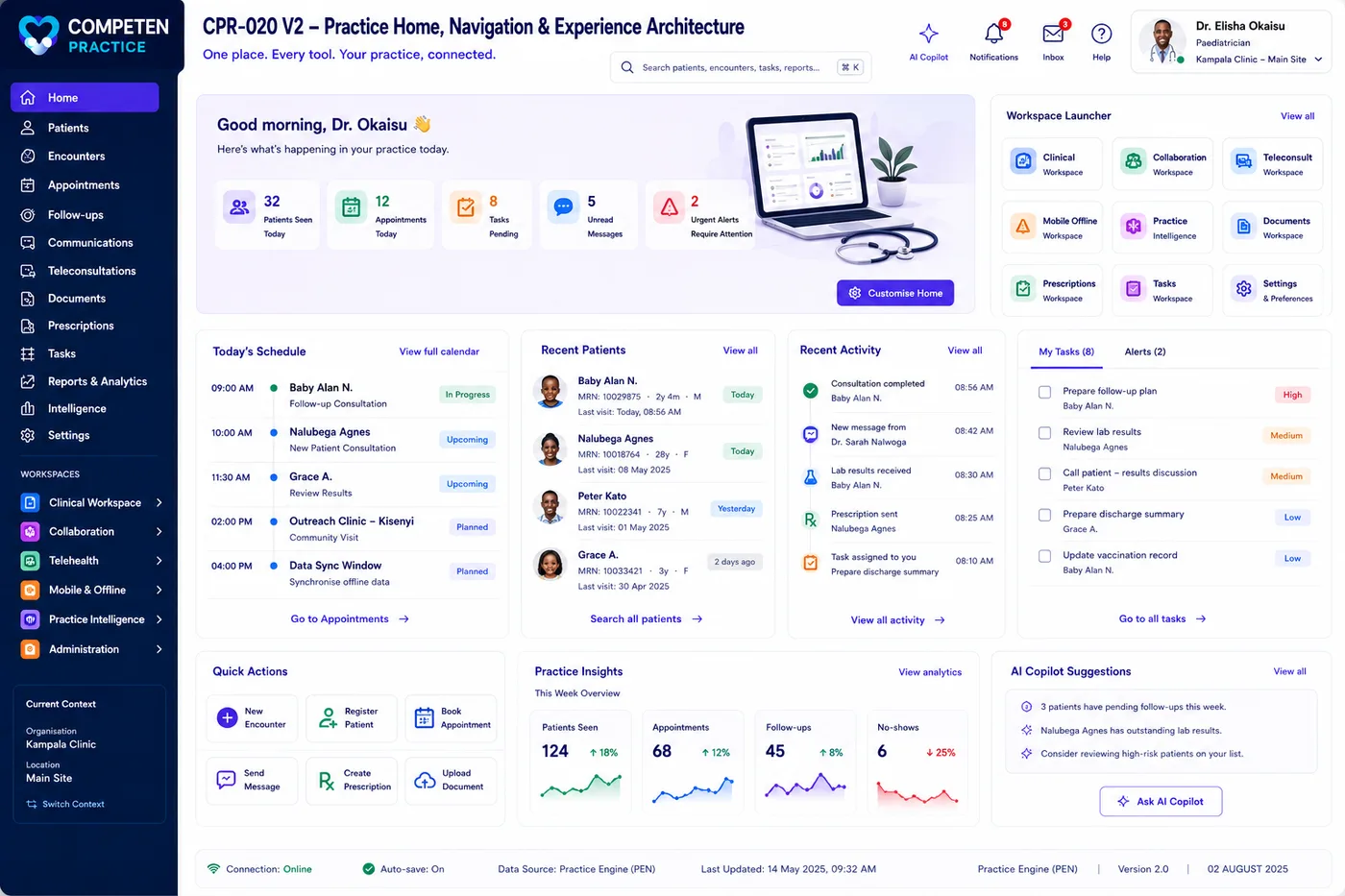
The Competen Practice home dashboard, showing today's schedule, follow-ups due and booking activity
Interface previews from the Competen Practice product design.

Where are you going?

  • It follows you

    Hospital A, Hospital B, your own clinic, an outreach round -- one personal record instead of five fragments.

  • No receptionist needed

    Designed to work for one clinician alone. Register a walk-in in under a minute and start seeing them.

  • Seconds, not forms

    Capture the minimum safely now and complete the detail later. Care does not wait for a long form.

  • It remembers for you

    Every encounter becomes searchable case experience: what you saw, what you did, what happened next.

It is not the hospital's record. That is the point.

Competen Practice is your professional record of your own authorised work with a patient. It is not the authoritative institutional record, and it does not try to be -- where a hospital runs an EMR, Practice connects to it rather than competing with it.

What it does

  • Your encounters, wherever they happened
  • Diagnoses, treatments, procedures and outcomes
  • Follow-up, recall and who is overdue
  • Documents, referrals and correspondence
  • Your own case memory and activity evidence

What it does not

  • The authoritative hospital medical record
  • Inpatient charts and medication administration records
  • Laboratory, radiology, billing or stock systems
  • Ownership of records imported from an organisation
  • A licence to disclose between the facilities you work at
  • Autonomous clinical decisions -- AI here is assistive and reviewable

How it works

Three moves. The first takes an afternoon; the other two happen every day, mostly without you.

  1. Say where and when you work

    Your locations, sessions, appointment types and booking rules -- across every facility you practise in. Patients book the slots you have genuinely opened.

  2. See the patient, capture in seconds

    Booked, walk-in or unscheduled, the encounter opens the same way. Record the minimum safely, link the diagnosis and treatment, and finish the detail later.

  3. Let it close the loop

    Each encounter sets what happens next, updates the timeline, files the follow-up, and adds itself to the case memory you will search a year from now.

The same day, from your patient’s side

Every step hands off to the next automatically. The practice does not have to remember any of them.

  1. 01

    Discover

    A patient finds your practice and your booking page.

  2. 02

    Book

    They choose from the slots you have genuinely made available.

  3. 03

    Confirm

    Confirmation and reminders go out automatically.

  4. 04

    Prepare

    A pre-visit questionnaire arrives, matched to the appointment type.

  5. 05

    Review

    You read the answers before the patient sits down.

  6. 06

    Record

    You log the diagnosis summary and the current treatment.

  7. 07

    Schedule

    The follow-up is booked before they leave.

  8. 08

    Return

    Recalls bring them back when they are due, not when they remember.

What is inside

Six areas, one product. Nothing below is a separate purchase.

Interface previews from the Competen Practice product design.

Everyone in the practice, on the right screen

  • Healthcare professionals

    Your day, your diary, your patients -- on one screen.

  • Patients

    Book, prepare, upload and follow their own care.

  • Reception and practice assistants

    A front desk that can see everything it needs and nothing it should not.

  • Practice administrators

    Locations, hours, users, templates and policy -- without a developer.

Larger groups can add an organisation administrator across multiple practices.

One practice. Many places. Boundaries intact.

You work across facilities; your record of that work should not be scattered across them. Competen Practice gives you one personal operational view without collapsing anybody's data boundaries.

  • Every encounter knows where it happened

    Facility, department, service, setting and the local patient identifier travel with the record.

  • Reports per facility, without leakage

    Filter and format for one hospital without exposing another's patients -- including the monthly list of who you saw and should be paid for.

  • The active boundary is always visible

    Switching context makes the organisation and its data boundary explicit, rather than leaving you to remember.

  • No silent cross-matching

    Patients are not linked across organisations automatically. That needs approved identity rules and consent.

What the AI may and may not do

Practice Intelligence is built on your own cases, so the rules about how it behaves matter more than the fact that it exists.

  • It cites its sources

    Any summary links back to the encounters it was drawn from, so you can check it rather than take it on faith.

  • It never decides

    Suggestions require your review and cannot silently change a record. No autonomous diagnosis, no autonomous prescribing.

  • Fact and inference look different

    A recorded fact, your interpretation, a calculated metric and an AI inference are labelled distinctly rather than blurred together.

  • Your patients are not training data

    No model training on identifiable patient data without an approved policy and a lawful basis.

  • Small groups stay private

    Population-level insight applies minimum cohort thresholds, so a pattern can never identify one person.

  • You can correct it

    Misclassified cases can be fixed, and records you judge inappropriate can be excluded from analysis entirely.

Why a practice can trust this

Not testimonials. The guarantees that come from how it is built.

  • Nothing crosses to another practice

    Your users, patients, appointments, documents and analytics are isolated. No other practice can see them, and no data is shared between tenants.

    • Isolated users and patients
    • Isolated appointments and documents
    • Isolated analytics
    • No cross-tenant visibility
  • One sign-in, wherever you work

    A clinician who works shifts at a hospital and runs a private clinic has one identity, not three. Switch between the workspaces you belong to without signing in again.

    • Single identity and sign-on
    • Switch without re-authenticating
    • Each workspace enforces its own permissions
    • Access follows your memberships
  • Enterprise plumbing you do not run

    Authentication, audit and compliance, notifications, AI services, the API gateway and monitoring sit underneath your practice and are maintained for you.

    • Authentication and access control
    • Audit and compliance records
    • Notification delivery
    • Monitoring and API access
  • Everything is audited

    Administrative actions, configuration changes, document activity and every login are recorded.

  • Consent is explicit

    Document sharing follows patient consent and your organisation's policy. Patients see what you share, not everything.

  • Reception cannot touch clinical records

    Role separation is enforced in the product, not left to good manners at the front desk.

  • Encrypted, in transit and at rest

    Documents are stored encrypted; exchanges with outside systems run over TLS and are logged.

  • Your data stays yours

    Export tools and open APIs. Nothing about the design is built to make leaving difficult.

Who can change what. Your practice administrator manages your clinicians, calendars, rules and branding, and cannot reach another practice or change platform-wide policy. Every administrative action is audited.

Connects to what you already run

Version 1 covers identity, notifications and document storage. The rest is on the roadmap, and the architecture is built for it -- REST APIs, webhooks and an FHIR-ready data layer.

  • Identity & single sign-on

    One account across Competen, with SAML or OAuth2.

  • SMS & email delivery

    Reminders and confirmations through your own provider.

  • Document storage

    Encrypted storage for reports, referrals and consent forms.

  • EMR & EHR systems

    Roadmap

    Standards-based exchange over HL7 and FHIR.

  • Laboratory & radiology

    Roadmap

    Results and reports back into the patient record.

  • Pharmacy systems

    Roadmap

    Prescriptions and medication information.

  • Payment gateways

    Roadmap

    Consultation payments and receipts.

  • Google & Outlook Calendar

    Roadmap

    Two-way sync with the diary you already keep.

Questions clinicians ask

  • Is this an electronic medical record?

    No, and the distinction matters. It is your professional record of your own authorised work with a patient -- not the authoritative institutional record. Inpatient charts, medication administration records, laboratory, radiology and billing systems are out of scope, and importing a hospital's data does not make that data yours. Where a hospital runs an EMR, Practice is built to connect to it rather than replace it.

  • I work at more than one hospital. Does that work?

    That is the design. One personal record spans every facility, clinic, outreach site and teleconsultation you work in, and each encounter carries where it happened and under which local identifier. What it does not do is join those worlds up behind the scenes: organisation data stays governed by that organisation, patients are not matched across them automatically, and a report for one hospital cannot expose another's.

  • Do I need a receptionist to use it?

    No. Working without one is a design principle rather than an afterthought -- a walk-in can be registered in under a minute and seen immediately, with the detail completed afterwards. If you do have an assistant, they can be added later with delegated permissions that stop short of your clinical records.

  • Do my patients need an account to book?

    No. A new patient can find a clinician, choose a time and book without an account. The account is created as part of confirming that first appointment, so registration is something that happens along the way rather than a wall in front of it.

  • Who can see my patients' information?

    Only your practice. Every practice is an isolated tenant -- users, patients, appointments, documents and analytics do not cross between them. Within your practice, access follows the role a person holds: reception can move a patient through the clinic and cannot alter a diagnosis or a treatment.

  • Can it work alongside the systems we already have?

    That is the intention. The data layer is FHIR-ready and there are REST APIs and webhooks for exchange. In Version 1 the working connections are identity, notification delivery and document storage; EMR, laboratory, pharmacy, payment and calendar connections are on the roadmap and are labelled as such wherever they appear.

  • What happens when a patient cancels?

    The slot is released immediately, and patients who opted into the waiting list are offered it automatically. Each is given a configurable window to respond before it passes to the next person, so a late cancellation does not become an empty afternoon.

  • What do we need in order to start?

    Your practice details, your locations and working hours, and the people you want to invite. Your practice is created with a first administrator account, that administrator configures the local settings, and the practice goes live. Security policy, backups and licensing are handled by the platform and are not yours to maintain.

  • Can I try it today?

    Not yet. Competen Practice is in development, and practices are being set up with us directly rather than through this website. If you would like to be among the first, tell us about your practice and we will get in touch.

Something else on your mind? Ask us directly.

See it with your own clinic in mind.

We will walk through your appointment book, your follow-up problem and your front desk, and show you what changes.

Start Your Practice →